A Powerful Way to Clean & Protect Your PC

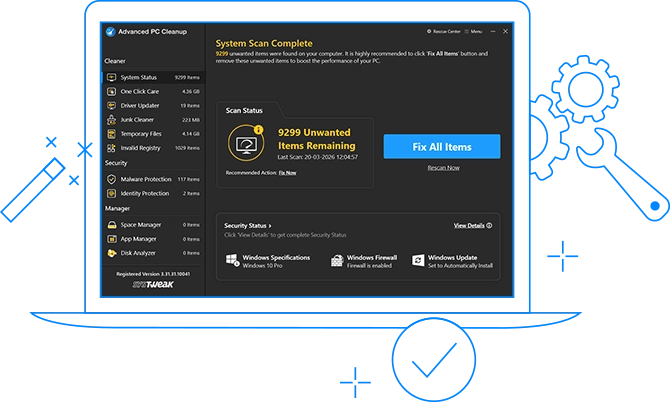
Advanced PC Cleanup is an all in one PC cleaner and optimizer which makes PC maintenance effortless. With a single scan, it identifies junk files, old downloads, temporary data, and hidden issues that slow down your system. The scan also detects malware, shows space you can recover, alerts you about outdated drivers, and tracks any identity information left behind on your browsers, all from one dashboard.

1. One-Click Care

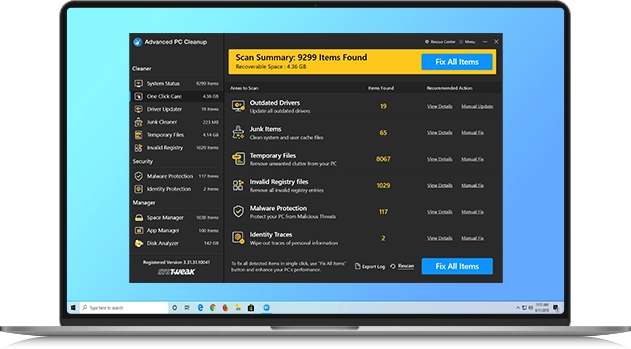
This powerful PC cleaner can fix slowdowns, remove clutter and security risks in a single click. Remove junk files, adware, and malware to boost speed and secure your data instantly.

2. Driver Updates Made Easy

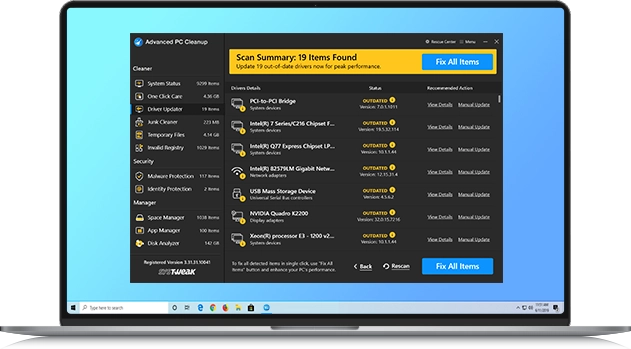
This driver updater scans your PC for outdated drivers and updates them to enhance hardware stability, resolve errors, and optimize system performance.

3. Deep Scan for Hidden Clutter

Find and remove unnecessary files, old downloads, large unused files, and cached browser data to free up valuable space and stay protected.

A Powerful Way to Clean & Protect Your PC
Download IconFree Download Purchase IconPurchase Now
For Windows 11/10/8.1/8/7 (both 32 bit and 64 bit)

Boost Speed, Remove Clutter, Stay Protected

From deleting junk and repairing registry errors to detecting malware threats, outdated drivers, and protecting your identity, Advanced PC Cleanup does it all.

One Click Care

One Click Care

Tune up your PC with one click. Remove junk files, fix errors, boost speed, and enjoy a smoother startup.

Driver Updater

Driver Updater

Update outdated drivers, keep hardware running smoothly, and improve system stability and performance.

Junk Cleaner

Junk Cleaner

Remove unnecessary files, clear system cache, log files, and program leftovers to free up storage and memory.

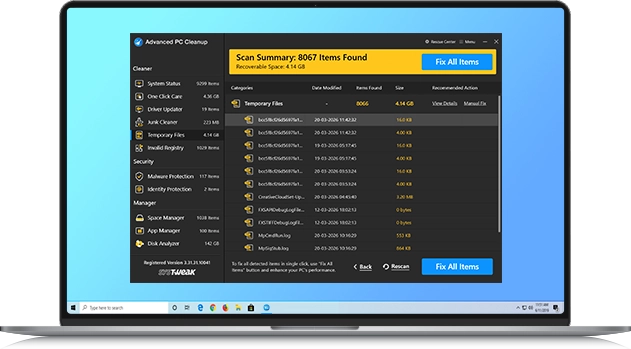
Temporary Files

Temporary Files

Delete cache, log files, old prefetch data, reports, and other temporary data to reclaim valuable storage space.

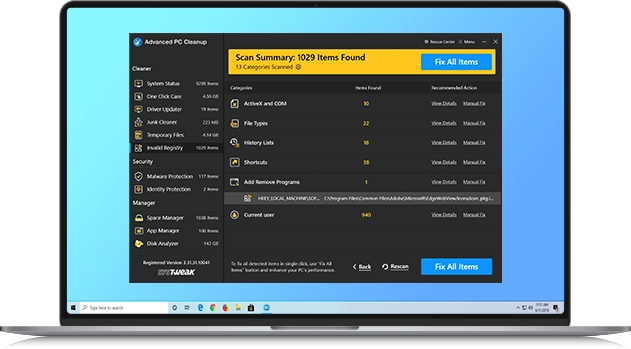
Registry Cleaner

Registry Cleaner

Fix invalid registry entries to enhance Windows stability, improve access speed, and enjoy smoother performance.

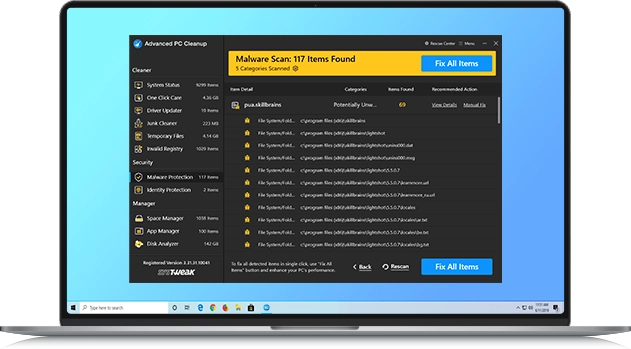
Malware Protection

Malware Protection

Scan and remove malicious threats to stay safe from harmful programs that can slow down or damage your PC.

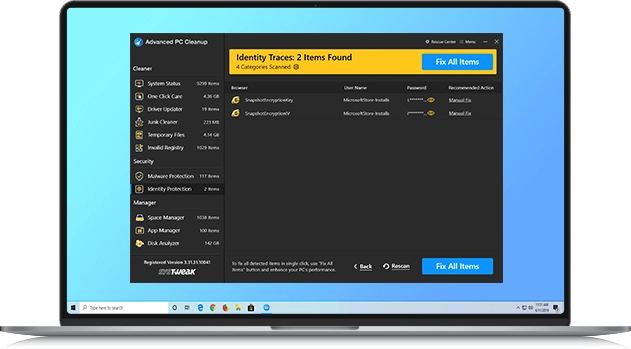
Identity Protection

Identity Protection

Erase saved browser data like usernames and passwords to protect your online identity from unauthorized access.

Space Manager

Space Manager

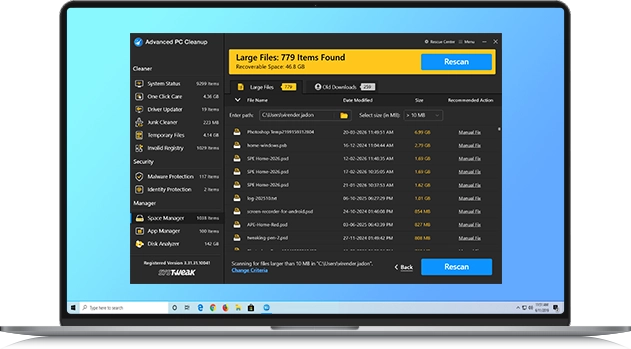
Find and clean old downloads and large files with unused data to free up storage space in just a few clicks.

App Manager

App Manager

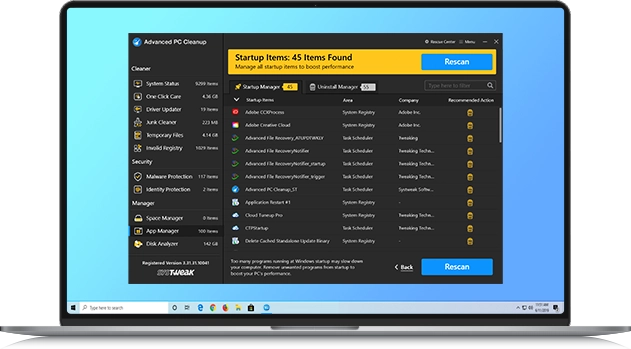
Disable startup items and uninstall unnecessary apps to speed up Windows and optimize system performance.

Disk Analyzer

Disk Analyzer

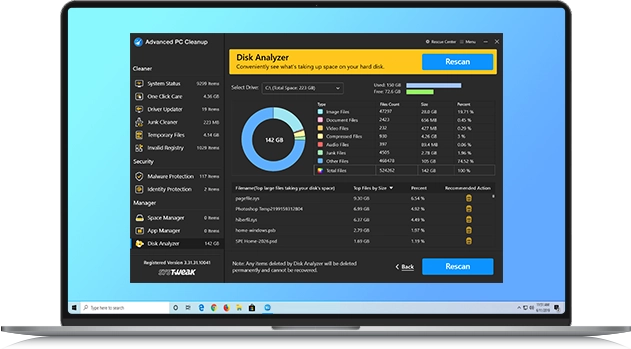
Scan your drives, view storage usage by file type, and delete large files to recover valuable disk space quickly.

Advanced Cleanup Features

Remove clutter, fix hidden issues, and keep your PC running smoothly

One Click Care

One Click Care

Analyze and remove unnecessary files, outdated drivers, and clutter that are slowing down your PC.

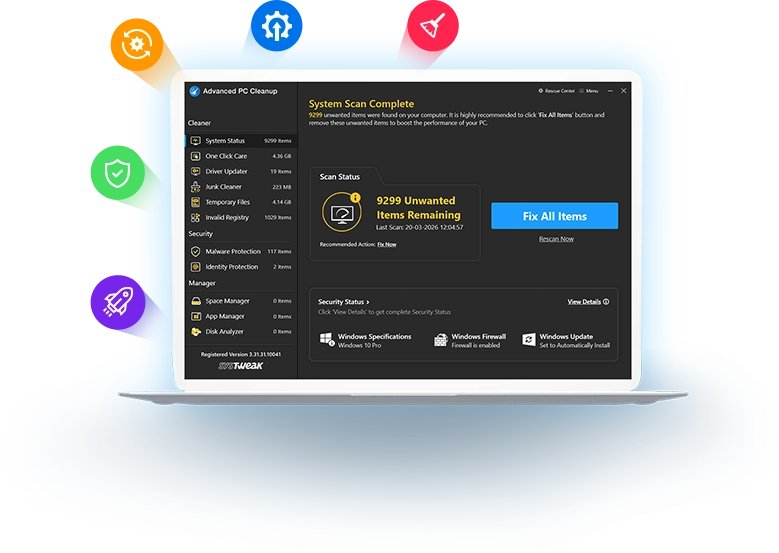
One Click Care takes care of your PC with a single click. It runs a comprehensive scan and fixes outdated drivers, junk files, temporary items, malware infections, identity-exposing traces, and invalid registry entries that consume space and slow down the PC all at once.

You don’t need separate tools to optimize and clean up your PC. The scan summary gives a clear breakdown of issues, and with the 'Fix All Items' button, you can fix them all instantly, keeping your system optimized in one go.

Driver Updater

Driver Updater

Keep your system secure and up to date while reducing crashes and glitches.

Outdated drivers can slow down performance and cause errors. The scan checks every device driver on your system and lists all missing or outdated drivers, along with their details, providing a quick and safe way to update them. With one click, you can install the latest driver updates to fix errors, improve compatibility, and avoid crashes.

This feature ensures your PC stays stable and runs smoothly with updated drivers for graphics, sound, and hardware. You can even view a scan summary highlighting outdated drivers, and by using the 'Manual Update' button, fix them all in one go.

Junk Cleaner

Junk Cleaner

Remove unnecessary files, app leftovers, and system logs that take up space, and reclaim valuable storage.

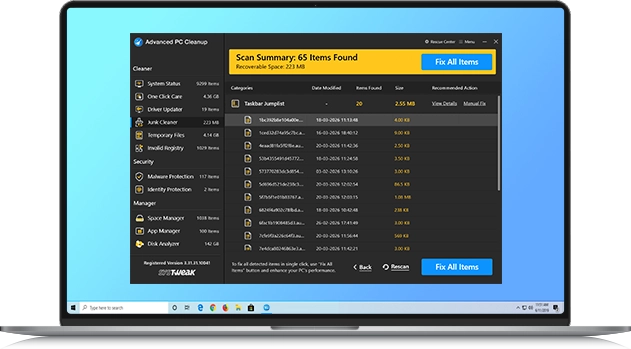
Junk files accumulate over time as you use your PC. Junk Cleaner removes this clutter by scanning the system for leftover log files, crash dumps, and unused data that take up disk space. It deletes these files in seconds, restoring storage space you may not have realized was wasted.

The feature also shows how much space is occupied by junk files and lets you delete them with a single click, freeing up storage and reducing the load on system resources. Instead of searching through folders manually, you see a clear list of unnecessary items with their total size. With one click, everything is safely removed, leaving your PC lighter and more responsive.

Temporary Files

Temporary Files

Clear cached data, app leftovers, and temporary items that slow down your Windows PC.

Every day use, like browsing, installing apps, or running updates, leaving behind temporary files that quietly take up space. While they serve a short-term purpose, these files pile up and make your PC slower over time. Temporary Files cleanup scans deep across the system to detect hidden data and shows how much storage can be recovered instantly.

With a single click, all temporary items are wiped away in bulk. The Scan Summary makes it easy to see wasted space, and the ‘Fix All Items’ button securely deletes them at once. This keeps your PC light, quick to respond, and free from clutter that builds up in daily use.

Registry Cleaner

Registry Cleaner

Fix broken or invalid registry entries to improve stability and reduce system errors.

When programs are installed or removed, they often leave behind broken or invalid registry entries. These small issues accumulate over time, slowing down your PC, causing errors, or even leading to crashes. Registry Cleaner scans the Windows registry, detects invalid entries, and safely repairs them in one go.

Resolve all Windows registry-related issues by cleaning the registry to minimize errors, prevent unexpected crashes, and maintain a smooth system operation.

Malware Protection

Malware Protection

Detects and removes malware and other malicious threats to keep your PC safe and secure.

Threats can hide in downloads, emails, or system files and silently slow down your PC. Malware Protection scans every corner of your system to detect harmful items before they cause damage. With one click, all threats are removed securely.

The Scan Summary clearly shows detected risks and their locations. Using the ‘Fix All Items’ button, you can wipe them in bulk. This keeps your PC protected, your privacy safe, and your system running smoothly without interruptions.

Identity Protection

Identity Protection

Erase saved logins, passwords, and browsing traces to keep your personal details private.

Web browsers save login details, passwords, and form data to make browsing easier, but this convenience also puts your privacy at risk. Identity Protection scans your system for these traces and gives you control over what stays and what gets erased.

With one click, you can wipe this data after reviewing the Scan Summary, which displays the browser name, username, and password. Removing these traces protects you from misuse and identity theft, keeping your digital life private and your accounts safe.

Space Manager

Space Manager

Find and delete old downloads and large files, and free up gigabytes of storage space.

Disk space fills up quickly with files you don’t notice, like old videos, large installers, and duplicate downloads. Over time, these occupy gigabytes of storage and make your PC feel sluggish. Space Manager scans your drives and gives a clear breakdown of how space is being used. You can easily see which files and folders take up the most space and decide what to keep or remove.

The scan summary presents your storage in an easy-to-read format, making it easy to decide which files to remove. With a single click, get rid of these files, free up valuable space, and keep your PC running fast.

App Manager

App Manager

Uninstall unwanted apps and disable startup programs to make your PC faster.

Unwanted apps running at boot time, as well as unused installed apps, often slow down your PC, as they consume unnecessary space and run in the background. App Manager gives you complete control over installed software and startup items. It shows the file size of each installed program and lists programs that run at boot time, making it easier to decide what to keep and what to remove.

With one click, you can completely uninstall apps without leaving leftovers that standard uninstallers often miss. You can also remove startup programs that delay boot and drain system resources. This keeps your PC faster, cleaner, and free from unnecessary apps.

Disk Analyzer

Disk Analyzer

See how storage is used and remove large files to free up valuable space.

Disk space fills up quickly without you noticing, with videos, large installers, and hidden system data. Over time, these occupy gigabytes of storage and slow down performance. Disk Analyzer scans your drives and gives a clear breakdown of how space is being used. You can easily identify which files and folders take up the most space and decide what to keep or delete.

The scan summary graphically presents your storage and categorizes the file types, making cleanup simple. Remove files that occupy the most space to free up valuable disk space and avoid low disk space warnings, keeping your PC fast and organized.

Basic Cleaning or Complete Security?

Choose the solution that suits you best

   
Advanced PC Cleanup - Features Advanced PC Cleanup Full Version

One Click Care

Clean junk files, update drivers, remove malware & fix invalid registry entries in 1-click.

arrow

Limited

arrow

Driver Updater

Keep outdated drivers up to date to enhance PC performance and stability.

arrow

Limited

arrow

Junk Cleaner

Remove leftover data like logs, cache, installer files and app remnants.

arrow

Limited

arrow

Temporary Files

Clean temporary data to boost speed and ensure smoother system operation.

arrow

Limited

arrow

Invalid Registry

Detect and repair broken or invalid entries in the Windows Registry to reduce system crashes.

arrow

Limited

arrow

Malware Protection

Scan and remove malware, spyware, viruses, and other threats that slow down your PC.

arrow

Limited

arrow

Identity Protection

Clear browsing data and secure personal information to protect your privacy and data.

arrow

Limited

arrow

Uninstall Programs

Delete apps you no longer use to free up space and improve performance.

arrow

Limited

arrow

Startup Manager

Manage startup items you don’t want to run at boot time and boost startup time.

arrow

Limited

arrow

Space Manager

Track large files, old downloads, and clean up this unused data to free valuable storage.

arrow arrow

App Manager

Manage startup apps and uninstall potentially unwanted software without leaving traces to free up space.

arrow arrow

Disk Analyzer

Analyze disk usage, identify space hogs, and organize storage with ease for improved performance.

arrow arrow
Money back

60-Days Money Back Guarantee 100% Risk-Free.

Your Satisfaction is everything for us. If you are not sure about the product, contact us within 60 days of purchase and we will process a refund against the purchase.

US$ 69.95 cross price
US$ 39.95
Buy Buy Now

1 Year Unlimited

Download Icon

Download Advanced PC Cleanup

Clean clutter, fix errors, and enjoy faster performance in 1-click using this powerful PC cleaner & optimizer.